How it works
Just copy
Nothing to set up, nothing to tidy.
Knows a keeper
Throwaways fade, the good stuff stays.
Private first
Secrets are caught on-device.
Agent Skills
Copy a skills repo.
Install it everywhere.
Spotted when you copy
A link to a skills repo lands on the Skills shelf with every skill inside listed, and the ones that include scripts flagged before you install anything.
One click, every tool
Pick the skills you want and install them for Claude Code, Codex, Cursor, Gemini CLI — every AI tool Shelfclip finds on your Mac.
Works with the skills CLI
Installed in the same layout as npx skills, so the CLI keeps working with them. When a skill you installed changes upstream, Shelfclip tells you.
anthropics/skills
17 skills · github.com
- frontend-design
- pdfincludes scripts
- skill-creatorincludes scripts
~/.agents/skills/pdf ← linked from each tool’s folder
The library
Nine shelves.
Zero folders.
Every clip is judged keeper or throwaway, filed on one of nine fixed shelves, and given 1–3 tags that snap onto the ones you already have. Move two clips from the same site to the same shelf and Shelfclip learns the rule. Come back later, calmly, for that thing you copied last week.
- All128
- Pinned7
- Read18
- Tools11
- Code23
- Skills4
- Ideas9
- People5
- Shopping
- Reference14
- Prompts6
- anthropics/skillsPublic repository for Agent Skills · 17 skills · github.com
- How to Do Great Workpaulgraham.com
- misty pine forest at dawn, a lone deer, 35mm --ar 16:9image prompt
- Cloudflare Durable ObjectsBuild stateful serverless applications… · developers.cloudflare.com
- git log --oneline --graph --allcommand
- “Design is how it works.”Steve Jobs
- handleSubmitTemporary · archives in 30 days
- Hidden — stays on this Mac1Password · expires in 58 min
How to Do Great Work
paulgraham.com · 51 min read
Five stars. In-depth · Original · Practical
How to choose what to work on, and the habits that let you do your best work on it.
- 1Choose work you have a natural aptitude for and a deep interest in.
- 2Learn enough to reach a frontier, then look for the gaps.
- 3Curiosity and your own projects keep you going.
- KEEP
- Keeper · worth reading
- SHELF
- Read
- TAGS
- Paul Graham, Careers — you never typed them
For your AI tools
Your assistants
read the shelves too.
what was that Durable Objects alarm gotcha I copied last week?
- DO alarms fire at most once per object; reschedule in the handlerCloudflare
- Durable Objects: one instance per id, strongly consistentCloudflare
- WebSocket hibernation keeps idle sockets freeCloudflare
An alarm fires at most once per object, so set the next one inside alarm() itself.
keep the deploy command for a week
Saved to From agents, expires in 7 days
Search, once you allow it
Sign in and approve each assistant. It can search and read your clips; secrets were never uploaded, so they can’t come back out.
Its saves get their own shelf
Tick “save and delete” and an assistant can save clips for you. They land on a From agents shelf, expire when it says, and it can only delete clips it saved itself.
Connect Claude Code
$ claude mcp add --transport http \shelfclip https://shelfclip.com/mcp
On your iPhone
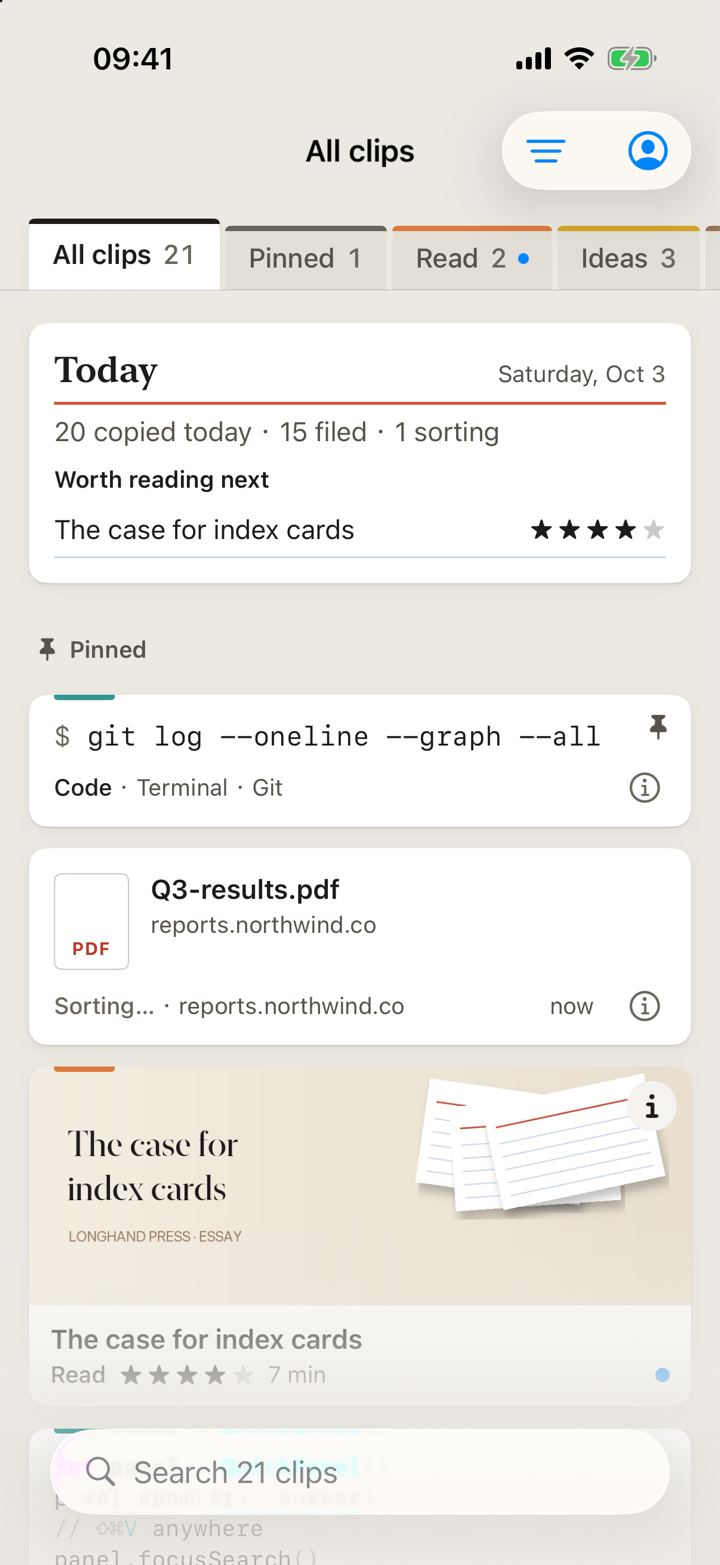
Every shelf,
in your pocket.
With Pro, sign in on your Mac and your iPhone and they share one library. Copy something on the Mac and it’s on your phone seconds later — already judged, filed and tagged. Things you save on the phone land on the same shelves.
Shelves sync in seconds
The same nine shelves, the same tags and the From agents shelf — updated live while the app is open.
Save from any app
Open Shelfclip and what you copied is saved. Or send a page, a link or some text from the share sheet in any app — also one tap away from the Home Screen widget, Control Center or the Action Button.
Search by meaning
Type “that ryokan in Kyoto” and find “Ryokan in Arashiyama, dinner included” — no exact words needed.
Get it on the App StoreSync and search by meaning are part of Pro.
Privacy
Secrets never
leave the device.
Caught on the device
Passwords from password managers, API keys, private keys, one-time codes and card numbers are recognised on your Mac, iPhone or in the browser extension and never uploaded.
Gone within the hour
Those clips stay on the device you copied them on and delete themselves after one hour.
Files stay local
Files from Finder never leave your Mac. A picture is sorted by the text read from it on the device; the picture itself is uploaded only to sync it, on Pro.
Only text goes up
The text and links you copy travel over an encrypted connection to be sorted — and, on Pro, synced. Each account’s clips live in their own isolated storage.
You decide what it reads
Pause capture for an hour, or tell Shelfclip to ignore an app — a copy from an ignored app is never read, not even into memory.
No ads, tracking or training
No ads, no analytics trackers, and your clips never train AI models. Delete your account and your library goes with it.
THIS MAC · NEVER UPLOADED
- Hidden — stays on this MacTerminal · API key · expires in 58 min
- Q3 plan.keyFile from Finder · 4.2 MB
- UPLOAD
- Never — caught on the device
- EXPIRES
- One hour after you copied it
- SERVER
- Checks again, and refuses it anyway
Pricing
Free to start.
Pro on every device.
Start free with no account: each device keeps your latest 100 clips. Upgrade when you want your whole history, one library on your Mac, iPhone and the web, every clip organised and search by meaning.
Free
$0
On your Mac and iPhone, for as long as you like
Download for Mac- Your latest 100 clips on each device
- 100 AI-organised clips a month
- Quick panel ⌘⇧V and instant search
- Connect AI assistants: keyword search, 100 saves a month
- 3 skill installs a month
- No sync: each device keeps its own clips
ProYearly · best value
$29.99/yr
or $3.99/mo · 14-day free trial for new subscribers
Try free on the App Store- Unlimited history
- Sync across Mac, iPhone and the web, pictures included
- Unlimited AI organising
- Search by meaning
- Web library in any browser
- Unlimited saves from AI assistants
- Unlimited skill installs
Lifetime
$99.99once
Pay once, keep Pro
Buy on the App Store- Everything in Pro
- Fair use: 3,000 AI-organised clips a month
- Above that, clips are organised more slowly — never stopped
Prices in US dollars; the App Store shows your local price. Pro and Lifetime are sold only through the App Store — in Shelfclip on iPhone or from the Mac App Store — and unlock every device signed in to the same account, plus the web library. Using the Mac app downloaded from this site? Buy on iPhone or the Mac App Store, then sign in on this Mac with the same account and Pro turns on there too.
Questions
Plain
answers.
How do things get into Shelfclip?
Can I write notes or to-dos in it?
What actually gets uploaded?
Why upload my text at all? Some clipboard apps keep everything on the device.
Does it work offline?
Do I need an account?
What does Free include?
Is there a Windows or Android version?
Where do I get the iPhone app?
I downloaded the Mac app from this site. How do I get Pro?
How do I cancel, and can I get a refund?
Which AI assistants can connect?
What does the skills install do?
SKILL.md) that tools like Claude Code, Codex and Cursor load when they need them. When you copy a link to a skills repo on your Mac, Shelfclip lists what’s inside, flags skills that include scripts, and installs the ones you pick into ~/.agents/skills with a link for each tool — the layout npx skills uses, so the CLI can still update or remove them.⌘C— start there
Copy anything.
It files itself.
Free · macOS 26+
No account needed
On your iPhone? Get Shelfclip on the App Store.